AI food logging
Free On-Device AI Food Logging: How It Works in Food Focus
The Settings menu has an On-device (Free) AI option. Here is when it is available, how to choose it, and where Cloud, photos, and internet access still matter.
Can you log food with AI for free?
Yes, on a compatible iPhone or iPad. Food Focus has an On-device (Free) AI model that can analyze a text or voice description on the device. You can review and correct its food and portion estimates before saving. The first 10 meal logs can use Cloud AI; after that, Cloud logging requires Pro. Choosing the on-device model lets an eligible device continue AI logging without Pro.
On-device is a model choice, not a claim that every app feature works offline. Barcode lookup and diary sync still use the internet. For packaged foods, compare the matched record with the package. For any AI result, check foods and amounts before saving.
How do you choose the free on-device model?
- 1
Open Settings
In Food Focus, tap the AI model row.
- 2
Select On-device (Free)
If your device is eligible, choose the local model. You can switch back to Cloud while you have included logs or Pro.
- 3
Try a simple meal
Describe the food and amount in text or voice, review the estimate, and correct anything that looks wrong.
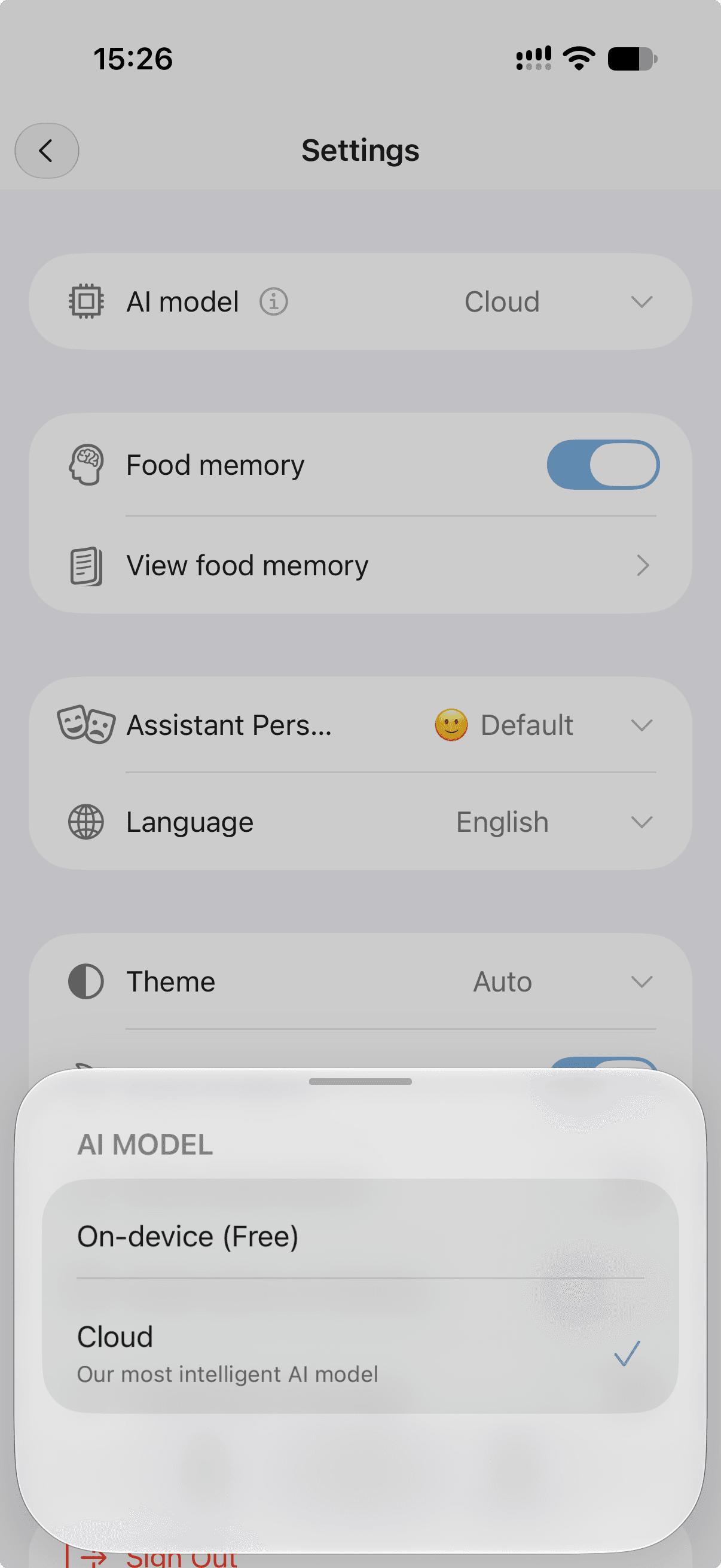
This screenshot shows Cloud selected. Tap On-device (Free) to change modes. If the local choice is unavailable, check device, software, Apple Intelligence, downloaded model, and app language support.
Which devices and inputs work?
Food Focus on-device AI currently requires an Apple Intelligence compatible iPhone or iPad, iOS or iPadOS 26 or later, Apple Intelligence enabled with its model downloaded, and a supported Food Focus app language. Apple maintains the current compatibility and setup list (opens in a new tab). The app checks the model and language on your device, so its availability message is the practical final check.
Text and voice logging are the simplest local inputs. Local photo analysis requires iOS 27 or iPadOS 27; on iOS 26, describe the meal in text or voice or use Cloud while available. The local model also supports Food Memory, recommendations, and daily insights on eligible devices. These are estimates and suggestions, not measurements or medical advice.
Food Focus also has Android logging, but this on-device Apple model is currently an Apple-device feature. For a quick comparison of inputs, see the food-logging methods guide.
When should you use Cloud instead?
Cloud is Food Focus's more capable AI model and works with text, voice, and photos. Use it when you prefer its analysis or need photo logging on an earlier supported iOS version. The first 10 saved meal logs can use it; after that it requires Pro. The on-device option can be a good fit when you want free ongoing text or voice logging on an eligible Apple device and are comfortable reviewing editable estimates.
Neither mode knows the exact weight of an unseen serving. Include amounts when you know them, then correct the result. If you log food through Siri in the background, the app may not show the normal pre-save review, so inspect that meal afterward. On-device Siri logging requires opening Food Focus.
Questions about free on-device AI
Is Food Focus on-device AI free after 10 meal logs?
Yes, if your iPhone or iPad supports the Food Focus on-device model. Cloud AI can be used with the first 10 saved meal logs and requires Pro afterward. The on-device model remains a free choice on an eligible device.
Can I use free on-device AI to analyze a food photo?
Local photo analysis requires iOS 27 or iPadOS 27. On iOS 26, use text or voice for on-device analysis, or use Cloud while you have included logs or a Pro subscription.
Does on-device mean Food Focus is fully offline?
No. Meal analysis using the local model runs on the device, but barcode lookup and diary sync still use the internet. The app also needs the Apple model to be downloaded and ready.
Why is On-device (Free) unavailable in Settings?
Check for iOS or iPadOS 26 or later, an Apple Intelligence compatible device, Apple Intelligence enabled, its model downloaded, a supported Food Focus language, and a recent native Food Focus build. Availability may also vary by region.
Does the free Apple model work on Android?
No. This on-device model is currently available only on supported iPhones and iPads. Food Focus has Android logging, but this Apple Intelligence option does not run there.
Choose your model
Try a reviewed food log.
On a compatible Apple device, open Settings, choose On-device (Free), and start with a short meal description.
Sources and further reading
These sources support the general explanation above. They do not endorse Food Focus, and research methods do not automatically establish the accuracy of any specific consumer app.
- How to get Apple Intelligence (opens in a new tab)Apple Support
Apple's current device, software, language, region, setup, and model-download requirements.
- Food Focus nutrition sources, methodology and limitations (opens in a new tab)Food Focus
Explains why food and nutrient values produced by app analysis remain editable estimates.